Bequant releases R5.0, with centralized management and AI Assistant
Centralized Management for multi-node deployments & AI Assistant

Bequant continues to innovate with the launch of R5.0, a major new release featuring powerful capabilities to optimize application network performance, provide deeper visibility into network traffic metrics, and further enhance ISP subscribers’ Quality of Experience (QoE).
Bequant’s R5.0 release offers:
- Centralized Management. Customers with multiple BQN servers can now manage them from a single GUI, eliminating the need to administer each server individually.
- AI Assistant. Provides detailed instructions and answers for BQN operation directly in the BQN graphic interface, with simple natural language prompts., in any language.
- More powerful QoE analysis. Subscriber and group QoE pages have been redesigned. They include easier-to-use filters, automatic warning thresholds and per-subscriber andper-group boxplots.
- Enhanced MPLS support.
- More flexible captive portal redirections, based on billing system subscriber status, policies, or REST API calls.
Centralized Management: Multi-node Management Flexibility
Manage Multiple BQN Appliances as One.
With a Bequant cluster, QoE software administrators can now see aggregated analytics and manage all of their BQN nodes from any one BQN node. Regardless of which server in the cluster the administrator accesses, the view remains the same. The cluster view provides real-time data on subscriber groups, flows, and throughput. The advantage is that existing multi-QoE server installations can easily migrate to the cluster without needing extra equipment.
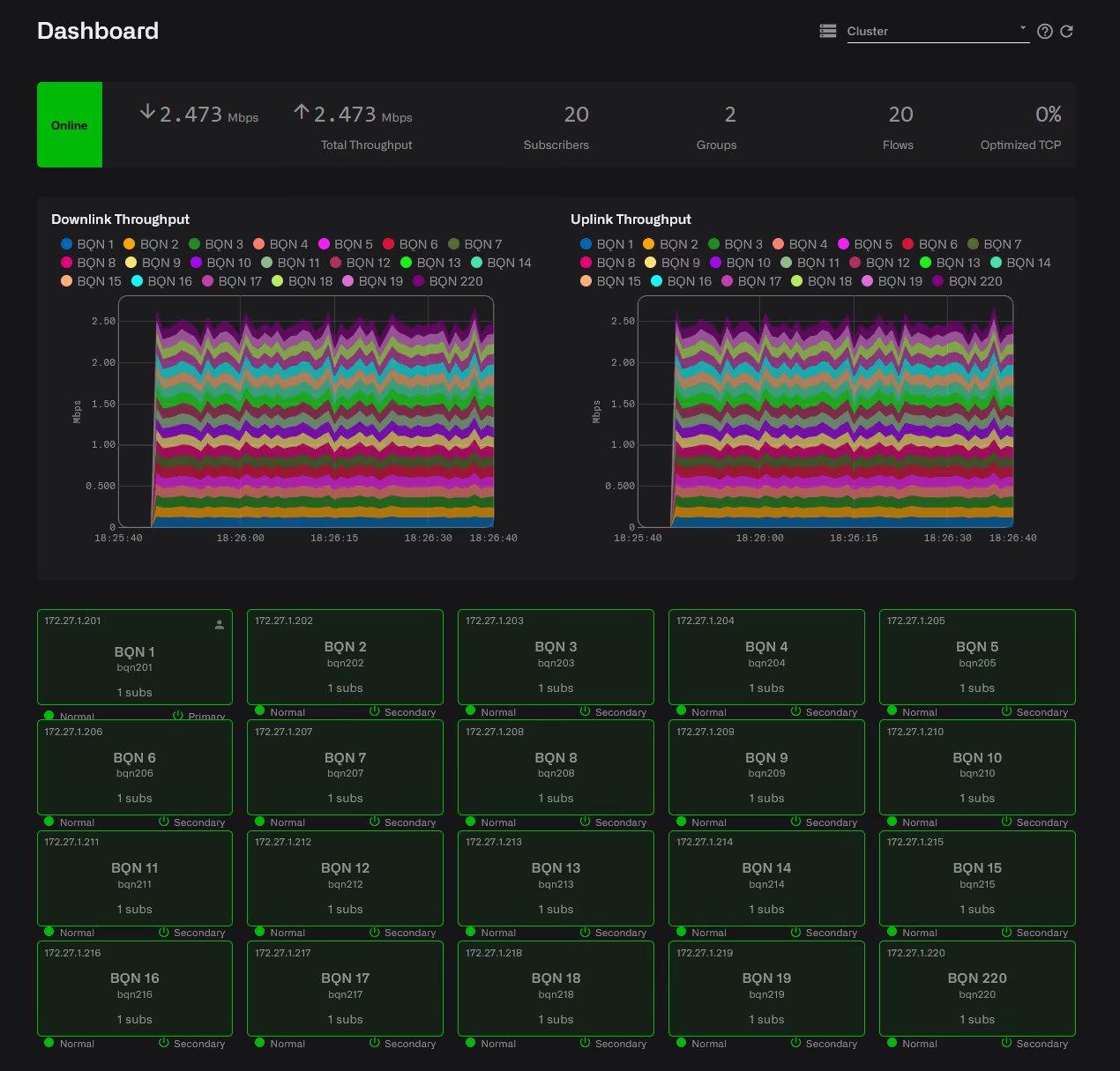
Cluster benefits include:
- A high-level view of the complete network via a common dashboard, accessible from any node in the cluster, to:
- See individual QoE servers' health metrics;
- Monitor and review aggregated statistics like uplink and downlink speeds, subscriber counts, flow counts, percent traffic under TCPO, latencies, packet retransmissions, and other KPIs; and
- Quickly navigate to any other individual node.
- Time savings: install new software packages across all nodes at once.
- Consistency: defining and implementing common subscriber traffic controls and rules across all cluster members.
- Simplified context: Control optimization settings like TCPO, ACM, and traffic shaping for each node or for all nodes at once, and from one view.
- Network-wide and node-level KPI analyses: include all, multiple, or one BQN node in any of our standard KPI trended views: latency, packet retransmissions, throughput, etc.
More information in our user guide, or ask the AI Assistant.
Artificial Intelligence Assistant
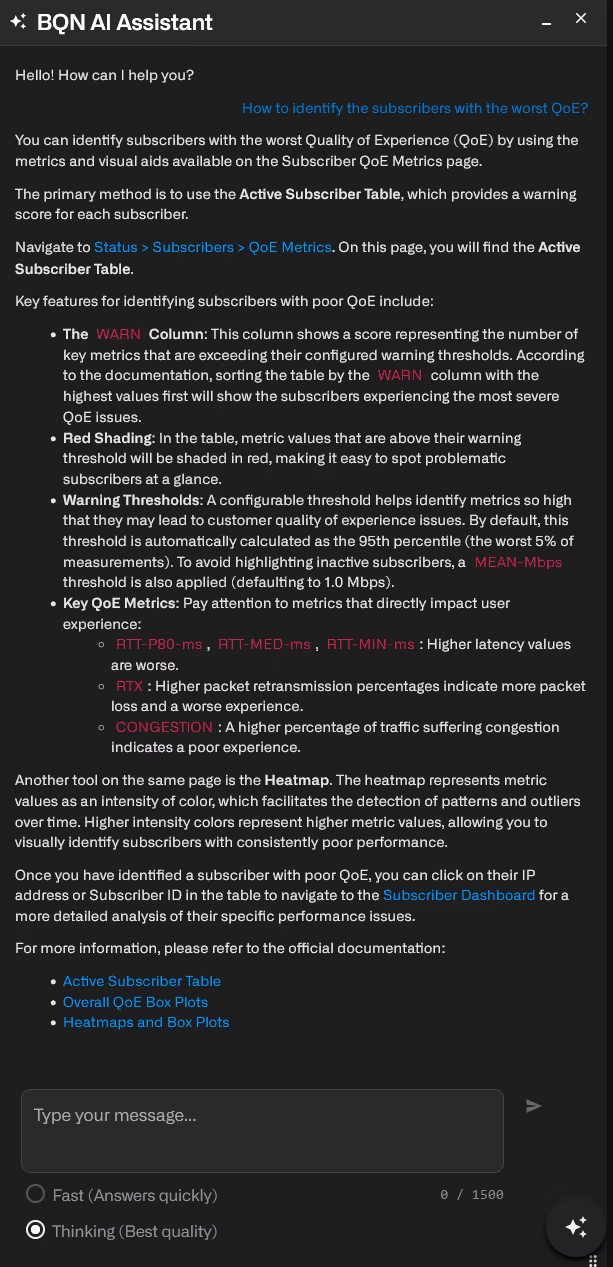
Since 2023, we have leveraged machine learning (ML) in our Automated Congestion Management (ACM) algorithms to improve end-user's quality of experience. We've now added a multi-language AI-based chatbot within our graphic user interface to allow BQN administrators to use natural language queries, in any language, and obtain How-to step-by-step methods and links to configure QoE or to quickly find network key performance indicators.
Ask our AI Assistant
The following are just a few kinds of questions you can ask AI Assistant (and it does not have to be in English, you can also use other languages):
- How do I restrict Netflix flows to 30Mbps?
- How do I find which subscribers have high congestion right now?
- Help me set up my NTP server.
- Where is subscriber's latency information found?
- Help me set up rate plan enforcement; we use ABC billing system.
- Is my server memory being stressed?
- What is the REST API call to see the list or subscribers in a network-group?
- When does my license expire?
AI Assistant Response
AI Assistant will utilize your management PC machine to research, retrieve, and display your query response within the BQN AI Assistant panel. Neither the BQN server appliance nor any of its interfaces are involved in the query / response so no additional core network routing /security / firewall modifications are required for AI Assistant.
In the dedicated AI Assistant panel, your response will be shown as an explanation, in the language you asked, with a step-by-step process including hyperlinks to both internal BQN GUI management pages, say, the Configuration / Subscriber Flows page; and supporting external sources: say, a specific page in the bequant.com/docs website.
More Powerful QoE Analysis
Bequant continues to add and improve our navigation controls so you can quickly sift through the data and get the key actionable information so you can make smarter decisions.
Subscriber and group QoE pages have been redesigned. They include more metrics, easier-to-use filters, automatic warning thresholds and per subscriber/group boxplots.
More information in our user guide for subscriber QoE metrics and for subscriber groups QoE metrics.
More Metrics to Choose from
Two more latency metrics, 80th-Percentile and Median, have been added so you have a choice when checking on this important KPI.

Automatic Subscriber KPI Warning Thresholds
Historically, warning levels were set manually within the Status / Subscribers / QoE Metrics box-plots. Beginning with this release, warning KPI thresholds will be automatically adjusted so only the worst 5% (configurabble) of subscribers are flagged. Of course, administrators can always override the auto settings or adjust them to their needs.

Flexible, Filterable Tables
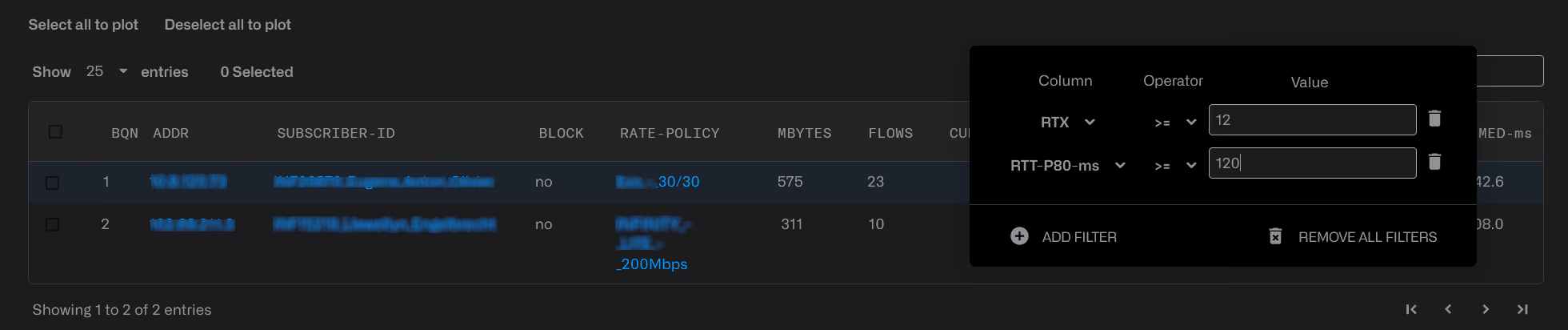
Now every table in the GUI can apply super-flexible filters. In particular, tables in the subscriber and group QoE pages benefit from those filters so you can now display only subscribers that meet very specific KPI metrics. As always, filtered results are exportable for further analysis with 3rd party tools.
Filter examples:
- Show only subscribers with round trip latency over 55 ms.
- Show only subscribers with current speed over 400Mbps within BQN cluster node #3.
- Show only subscriber flows to netflix.com with downlink speeds over 30Mbps.
- Show subscribers with TCP Retransmit % over 12% AND roundtrip P80 latency over 120 ms.
Enhanced MPLS Support
We now support common MPLS services where the MPLS label stack is followed directly by a supported L2 Ethernet frame or L3 IPv4/IPv6 packet. Those include MPLS L3VPN, MPLS-TE, SR-MPLS, EVPN-MPLS, VPLS, VPWS and Ethernet pseudowire traffic, subject tothe restrictions specified in our user guide.
More Flexible Captive Portal Redirection
We've decoupled our captive portal re-director from traffic volume quotas and made it also triggerable based on a subscriber status in your billing system (e.g. in delinquency), a blocking policy in the BQN, or a REST API call. Slow down rate limit instead of redirection also possible, as well as skipping blocking for certain contents. More information in our user guide.
Previous Releases
For a full list of release notes, see here.